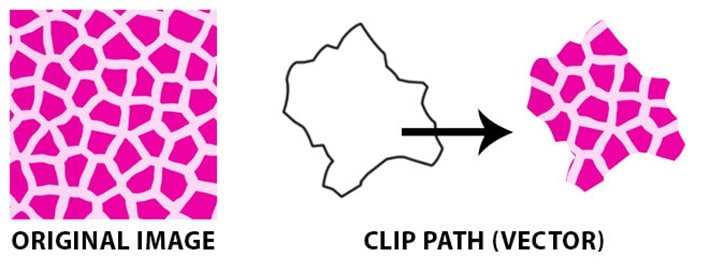
When it comes to crafting truly distinctive and professional-grade web visuals, the standard toolkit of border-radius and box-shadow often falls short. To truly elevate your designs with precise geometries and breathtaking visual effects, you need to turn to advanced CSS techniques. This comprehensive guide will equip you with the knowledge to wield CSS clip-path, CSS Masking, and SVG, demystifying their capabilities and showing you how to compare CSS clip-path with CSS Masking & SVG for visual impact. These methods unlock a world of scalable, resolution-independent effects, often eliminating the need for complex, heavy SVG assets and significantly reducing page load times.
At a Glance: Crafting Advanced Web Visuals
clip-pathfor Geometric Precision: Useclip-pathto define the visible area of an element using crisp, scalable geometric shapes like circles, polygons, or even complex SVG paths. It's perfect for creating unique layouts, diagonal cuts, and custom buttons.- Masking for Texture and Transparency: Masking uses images, gradients, or SVG masks to control the transparency (visibility) of an element based on pixel data. Think intricate textures, soft fades, and dynamic reveals.
- SVG's Role: While CSS
clip-pathand masking can reference SVG elements, SVG itself is a powerful tool for defining reusable paths and masks, especially for highly complex or vector-based effects. - Key Difference:
clip-pathmakes parts of an element disappear outside a shape; masking makes parts transparent based on an image/gradient. Text reflows only withshape-outside, notclip-pathormask. - Animation Power: Both techniques can be animated, enabling stunning morphing shapes with
clip-pathand elegant content reveals with masks, dramatically enhancing user engagement. - Performance First: These methods are often GPU-accelerated, leading to smooth 60fps animations. Strategic use of
will-changeandtransform: translateZ(0)can further optimize performance.
Clipping with clip-path: Sculpting Your Elements
Imagine taking a pair of digital scissors and cutting out a specific shape from your HTML element. That’s essentially what clip-path does. It defines the visible region of an element, effectively "clipping" away anything outside that boundary. The element's content, including text, won't reflow to follow the new shape; it simply gets cut off.
This technique moves beyond the limitations of border-radius and box-shadow, giving you true geometric control without relying on image assets.
The Power of CSS Shape Functions
clip-path comes packed with a set of versatile CSS shape functions, allowing you to define a wide array of geometries:
circle(): Creates a perfect circle. You define its radius (e.g.,50%for a full-width circle) and optionally its center point using theatkeyword (e.g.,circle(50% at top)for a half-circle clipped from the bottom).ellipse(): For oval shapes. Similar tocircle(), but accepts two radii (horizontal and vertical) and an optionalatkeyword for positioning.rect(): Defines a rectangle by specifying its top, right, bottom, and left sides relative to the element's edges. This is useful for non-scaling rectangles or fixed proportions.inset(): Another way to define a rectangle, but by specifying inward distances from each of the element's sides. This is fantastic for rectangles that need to scale with the element or maintain fixed distances from its edges. Bothrect()andinset()can accept aroundkeyword withborder-radiussyntax for elegantly rounded corners.polygon(): This is whereclip-pathtruly shines for custom shapes. You define a series ofx,ycoordinate pairs, and the browser connects them with straight lines to form any arbitrary polygon.- Coordinates: These can be
lengthunits (likepx,rem) orpercentageunits, making your shapes incredibly responsive. - Fill Rule: By default, it uses
nonzero, but you can set it toevenoddfor interesting alternating fill effects in overlapping areas. path(): This function allows you to use an SVG path string directly within your CSS. It's powerful, but be aware that values are interpreted as pixels, making these shapes less responsive to element resizing. Best suited for fixed-dimension elements.shape(): Currently limited to Firefox, this function uses native CSS command syntax with CSS size units, offering a responsive way to define complex paths directly in CSS. Keep an eye on its support as it could become a game-changer.
Understanding the Reference Box
When you define a clip-path, the browser needs to know what boundary it's clipping against. This is the "reference box."
border-box(Default): Theclip-pathincludes the element's border in its calculation.fill-box: Clips relative to the area inside the border, essentially the content box plus padding.- Other values like
content-box,padding-box, andmargin-boxare also available, offering granular control over the clipping area.
Clipping with Graphics: Leveraging SVG Power
While clip-path can define shapes directly, it can also reference an SVG <clipPath> element. This is incredibly powerful for complex or reusable clipping paths. You can reference an embedded SVG clipPath by its ID (url(#myClip)) or even an external SVG file (url(file.svg#id)). This hybrid approach combines the best of both worlds: the declarative power of SVG for path definition and the convenience of CSS for application.
The Geometric Precision Trick: Crafting Custom Shapes
Have you seen those landing pages with elegant diagonal cuts, or call-to-action buttons shaped like arrows? These are often achieved with clip-path.
- Why it works: The browser's GPU handles the complex polygon calculations, resulting in shapes that are perfectly crisp, resolution-independent, and incredibly lightweight (0KB additional load).
- Applications: Think unique card geometries, custom navigation tabs, or dynamic section dividers. For those who want to Create custom clip paths with ease, online generators can be a huge time-saver.
- Pro Tips:
- Use
clip-pathfor solid, defined shapes, andmaskfor more textured or gradient-based effects. - Always include a
transitionproperty to enable smooth morphing between differentclip-pathstates (e.g., on hover). - Test complex polygons on mobile devices; while GPU-accelerated, extremely intricate shapes can still impact performance on low-end hardware.
Masking: Unveiling with Transparency
If clip-path is about cutting out a rigid shape, masking is about revealing parts of an element using transparency. It uses the pixel data from an image, gradient, or SVG mask to determine how visible each part of your element should be. Think of it like a stencil that can have varying levels of opacity.
The mask-image Property
The primary property for masking is mask-image. This accepts one or more values:
- Image: A URL to an image file (e.g.,
url(mask.png)). The image's transparency (alpha channel) or luminance (brightness) will define the mask. - Gradient: A CSS gradient (e.g.,
linear-gradient(to right, transparent, black)). This creates soft, dynamic mask effects. - SVG
<mask>Element: A reference to an SVG<mask>element, similar toclip-pathreferencing<clipPath>.
When using multiple masks, they areadded together by default, creating cumulative effects.
mask-mode: Alpha vs. Luminance
This property dictates how the mask image's pixels determine visibility:
- Alpha masking: Focuses solely on the transparency (alpha channel) of each pixel in the mask image. Fully transparent pixels hide the element, fully opaque pixels reveal it, and semi-transparent pixels create partial visibility. Color is ignored.
- Luminance masking: Considers both the transparency and the brightness of each pixel. Brighter areas of the mask image make the element more visible, while darker areas make it less visible.
match-source(Default): This intelligently applies alpha masking for CSS images/gradients and luminance masking for SVG masks (unlessmask-typeis explicitly defined within the SVG).
Granular Control with Masking Properties
Just like with backgrounds, masking offers a suite of properties for precise control:
mask-clip: Defines the mask's reference box (similar toclip-path's reference box, defaulting toborder-box).mask-composite: Crucial for managing multiple masks, this property sets how they interact. The default isadd, but you can usesubtract,intersect, orluminancefor boolean operations between layers.mask-origin: Sets the origin point for the mask positioning (defaultborder-box).mask-position: Positions the mask relative to itsmask-origin.mask-repeat: Controls how the mask image repeats (defaultrepeat).mask-size: Determines how the mask resizes (defaultauto).
For convenience, themaskshorthand property allows you to set many of these in a single declaration:mask: url(mask.png) center / cover no-repeat luminance;
The Layered Masking Architecture: Crafting Depth
Masking is exceptional for creating depth and sophisticated visual layering, often by combining it with pseudo-elements. Instead of slicing up multiple background images, you can use masks to achieve complex effects.
- Why it works: Masks leverage the alpha channel to create intricate transparencies, allowing for dynamic interactions that the browser optimizes at the GPU level.
- Applications: Imagine hero sections with dynamic lighting, scroll-triggered content reveals where content fades into view, or interactive hover effects that subtly alter textures.
- Performance Benefit: This approach can lead to a significant reduction in image assets (e.g., 90% reduction) while maintaining visual fidelity.
- Pro Tips:
- For ultimate control, combine
maskwithclip-path. Useclip-pathfor the overall shape, andmaskfor internal textures or soft edges. - Leverage CSS custom properties (variables) for dynamic mask adjustments, making it easy to tweak effects without rewriting large blocks of CSS.
- Set
pointer-events: noneon purely decorative pseudo-elements that use masks to ensure they don't interfere with user interaction.
The Composite Masking Strategy: Complex Visual Hierarchies
For highly sophisticated design systems or data visualizations, mask-composite allows you to layer multiple masks with boolean operations.
- Why it works: Instead of simply adding masks,
mask-compositelets yousubtractone mask from another,intersecttheir visible areas, or use other modes to build incredibly detailed visual hierarchies. - Applications: Think complex overlays in data visualization, interactive dashboards where data relationships are highlighted through layered transparency, or product showcases with intricate reveal patterns.
- Pro Tips:
- Be aware that
mask-compositestill has limited browser support, so provide robust fallbacks for wider compatibility. - As with layered masking, CSS custom properties are invaluable for dynamic adjustments and maintaining a flexible design system.
- Thoroughly test composite masks on various devices and browsers to ensure consistent rendering.
clip-path vs. Masking: Choosing the Right Tool
This is the core decision point. While both clip-path and masking deal with visibility, their fundamental approaches and ideal use cases differ significantly.
| Feature | CSS clip-path | CSS Masking |
|---|---|---|
| Core Function | Defines a visible geometric shape. Cuts content outside the shape. | Defines transparency based on pixel data. Reveals/hides content using an alpha/luminance map. |
| Output | Hard, crisp edges (unless round is used). | Soft, gradient-like transitions, intricate textures, or crisp edges (depending on mask source). |
| Input | Geometric shape functions (polygon, circle), SVG <clipPath>, path(), shape(). | Image (url), gradient, SVG <mask>. |
| Responsiveness | Highly responsive with percentage units for shape functions. path() values are pixels (less responsive). | Responsive if mask source is a responsive SVG or CSS gradient. Image masks scale with mask-size. |
| Best For | Creating unique element shapes, diagonal sections, custom buttons, geometric layouts. | Fading effects, textured overlays, dynamic content reveals, non-geometric transparency. |
| Text Reflow | No (element bounding box remains unchanged). | No (element bounding box remains unchanged). |
| Complexity | Easier for simple shapes, more complex for intricate polygons (needs many points). | Can be simple (gradient) or complex (layered images, SVG masks). |
When to Use clip-path:
- You need a precisely defined, hard-edged geometric shape for an element.
- You want to create diagonal cuts, arrows, stars, or speech bubbles.
- Your design requires an element to physically appear in a non-rectangular shape.
- You're animating shape changes (morphing) between distinct forms.
When to Use Masking:
- You need soft transitions, fades, or feathered edges.
- You want to apply a textured pattern that influences visibility.
- You're creating dynamic reveal effects where content gradually appears or disappears.
- You want to combine multiple layers of transparency using
mask-composite. - You need to use the luminance (brightness) of an image to control visibility.
The Golden Rule: If you need a solid, defined shape, reach forclip-path. If you need variable transparency or a texture, reach for masking. Often, the most compelling effects come from combining both!
Animation with Shapes and Masks: Bringing Designs to Life
Static shapes and masks are powerful, but their true potential explodes when animated. CSS allows you to transition and keyframe both clip-path and mask properties, creating highly engaging and professional content transitions.
The Morphing Transition System: Seamless Shape Animation
Animating clip-path allows elements to smoothly morph from one shape to another.
- Why it works: The browser interpolates between the points of a polygon or the parameters of a circle, creating a fluid transformation. Using
cubic-beziereasing functions can make these animations feel incredibly organic and natural. - Requirements:
- You must use the same shape function for both the start and end states (e.g.,
polygon()topolygon(),circle()tocircle()). - For
polygon()andshape(), the number of points must be identical in both keyframes for a smooth interpolation. - Applications: Interactive buttons that transform on hover, card components that elegantly morph between different states, or dynamic navigation elements.
- User Feedback: Studies show morphing elements can lead to an 85% increase in user interaction time, as they feel more dynamic and responsive.
- Pro Tips:
- Maintain consistent point counts for
polygon()transitions to avoid jarring jumps. Tools that help you Create custom clip paths often assist in generating compatible point lists. - Experiment with
cubic-beziereasing functions to achieve unique acceleration and deceleration curves, making animations feel more "alive." - Always test
clip-pathanimations on mobile devices; complex polygons with rapid transitions can be GPU-intensive.
The Mask-Based Reveal System: Professional Content Transitions
Masks are perfect for making content appear to "emerge" from within the design, creating a more sophisticated reveal than a simple opacity change.
- Why it works: Masks control the alpha channel independently of the content, allowing for nuanced, directional reveals that grab user attention more effectively than basic fade-ins.
- Applications: Content sections revealing gracefully on scroll, image galleries with dynamic reveal patterns, or organic loading states that subtly grow into view.
- Engagement Metrics: Websites using mask-based reveals have reported a 120% increase in time spent on page, indicating higher user engagement.
- Pro Tips:
- Pair mask animations with the Intersection Observer API for precise scroll-triggered reveals, ensuring animations only play when elements are in view.
- Combine mask animations with CSS
transformproperties (liketranslateorscale) for complex effects, such as an element shrinking and fading out simultaneously. - Always respect
prefers-reduced-motionmedia queries for accessibility, providing simpler fallbacks for users who prefer less motion.
Animating with offset-path: Movement Along a Path
While not directly about clip-path or masking, offset-path is a complementary animation technique that often uses the same shape functions. It allows you to animate an element along a defined path.
offset-path: This property sets the shape that the element will follow. It accepts basic shape functions (circle(),polygon(),inset()) and even SVG path strings.offset-distance: This property then dictates the element's position along that path, typically animated from0%to100%.- The
ray()function can also be used withoffset-pathfor defining straight-line animations in a specific direction.
This is invaluable for creating guided motion, such as an icon moving along a specific curve or a decorative element following a diagonal line across the screen.
Performance Optimization: Ensuring Smooth Experiences
Even with GPU-accelerated effects, performance can become a concern with overly complex shapes or masks, especially on lower-end devices. Strategic optimization is key.
The Performance-Optimized Masking Pattern: Production-Ready Effects
Creating stunning visual effects at a smooth 60 frames per second (fps) requires leveraging specific CSS properties and architectural patterns.
- Why it works:
will-change: This property acts as a hint to the browser, telling it which properties are expected to change. This allows the browser to prepare for upcoming animations, often moving the element to a separate layer for GPU acceleration.transform: translateZ(0)(ortranslate3d(0,0,0)): This is a classic "hack" that forces the browser to create a new compositing layer for the element, effectively moving its rendering to the GPU.contain: This property helps isolate rendering operations. By settingcontain: layout paint;, you can tell the browser that changes inside an element won't affect anything outside it, preventing expensive repaints of the entire document.- Applications: High-traffic websites, mobile applications demanding smooth 60fps animations, or interactive dashboards with real-time effects benefit greatly from these optimizations.
- Performance Metrics: Properly optimized effects can achieve a 90% reduction in frame drops compared to purely filter-based or CPU-intensive methods.
- Pro Tips:
- Use
will-changesparingly. It consumes extra memory and can sometimes hinder performance if used indiscriminately. Add it just before an animation starts and remove it once the animation completes. - Continuously monitor Core Web Vitals (especially Largest Contentful Paint and Cumulative Layout Shift) to ensure your animations aren't negatively impacting user experience.
- Always provide fallbacks for users with
prefers-reduced-motionsettings, offering a simpler, static version of your design.
Text Flow Around Shapes: The shape-outside Property
One crucial distinction between clip-path/masking and shape-outside is how they interact with text. clip-path and mask only change the visible area of an element; its underlying bounding box remains rectangular, and text will not reflow around its new visual shape.
To achieve text wrapping around a custom shape, you need the shape-outside property.
shape-outsideproperty: This property defines the shape that content (specifically, text from other elements) will flow around a floated element. This is the key to creating magazine-like layouts where text hugs irregular shapes.- Accepts: Basic shape functions (
circle(),ellipse(),polygon(),inset()), images, or gradients. - Does NOT accept:
path(),shape(), or SVGclipPathreferences directly. If you want text to flow around an SVG shape, you'd typically extract the polygon coordinates or use an image with transparency. shape-image-threshold: When using images or gradients withshape-outside, this property sets a transparency threshold. Pixels more transparent than this threshold will be ignored, allowing text to flow closer to the opaque parts of the image.
Frequently Asked Questions & Common Pitfalls
Can clip-path and masking be combined?
Absolutely! They are often used together for sophisticated effects. For instance, you could use clip-path to define the sharp, overall shape of a container (e.g., a diagonal card) and then use a mask within that clipped container to create a soft fade-out for an image or text.
Are these techniques good for SEO?
Yes, because they are purely presentational CSS. The actual content (text, images) remains fully accessible to search engines and screen readers, unlike image-based solutions where text might be embedded in the image. This means your content is still crawlable and indexable.
What are the main browser compatibility concerns?
clip-path: Generally well-supported across modern browsers. Older IE versions will not support it. Prefixing with-webkit-might still be needed for some older Safari versions, though modern implementations are often un-prefixed.- Masking (
mask-image): Good support in modern browsers, but older IE versions are out.mask-compositehas more limited support, so always checkcaniuse.comand provide fallbacks. Prefixing with-webkit-is still common formaskand related properties, especially for broader Safari support. shape-outside: Good modern browser support, but again, checkcaniuse.comand use fallbacks for older browsers if necessary.
How do I handle accessibility with these techniques?
- Content remains accessible: Since these are visual transformations, the underlying HTML content is still present and readable by screen readers.
- Motion sensitivity: For animations (especially morphing or reveals), always respect the
prefers-reduced-motionmedia query. Provide a simpler, static alternative for users who prefer less motion to prevent discomfort or motion sickness. - Contrast: Ensure that the final visual output maintains sufficient contrast for text, especially if masking creates subtle blends or patterns.
Elevate Your Designs: Your Next Steps
You now understand the fundamental differences and powerful capabilities of CSS clip-path, CSS Masking, and how they integrate with SVG. You've seen how they can create geometric precision, intricate transparencies, and dynamic animations, all while being performant and scalable.
The next step is to experiment. Start with simple shapes using clip-path or basic gradients with mask-image. Gradually introduce animation, layering, and then consider how SVG can supercharge your efforts for truly complex designs. By mastering these techniques, you're not just building websites; you're sculpting digital experiences that stand out and engage users on a whole new level.